Your AI Stack Is Only as Good as Your Workflow Design
A viral post from June 2026 breaks down the AI tools shaping how people work this year. Here is what the categories inside that list actually tell operators about building with AI.
The Signal #030 — Dakota’s read on the AI news that actually matters to people running a business.
Most “best AI tools” lists are just a roundup of logos. You scan them, maybe click one or two links, and move on without changing anything. But occasionally a list is organized in a way that tells you something more useful than the tools themselves.
This one is worth a closer look.
What happened
On June 18, 2026, Nisha Mehta posted on X what she called a breakdown of the best AI apps shaping 2026. The post pulled 360 views and organized the AI landscape into four distinct categories: general assistants (ChatGPT, Claude, Perplexity), development and productivity tools (Cursor, Replit, Grammarly, NotebookLM), content and creativity tools (Midjourney, Runway, Canva, Suno, HeyGen), and automation tools (Zapier, n8n, Notion, Apify).
Her central argument was this: “In 2026, your competitive edge won’t be AI alone. It will be your AI stack plus workflow design.”
That framing is the signal worth extracting.
Why it matters for operators
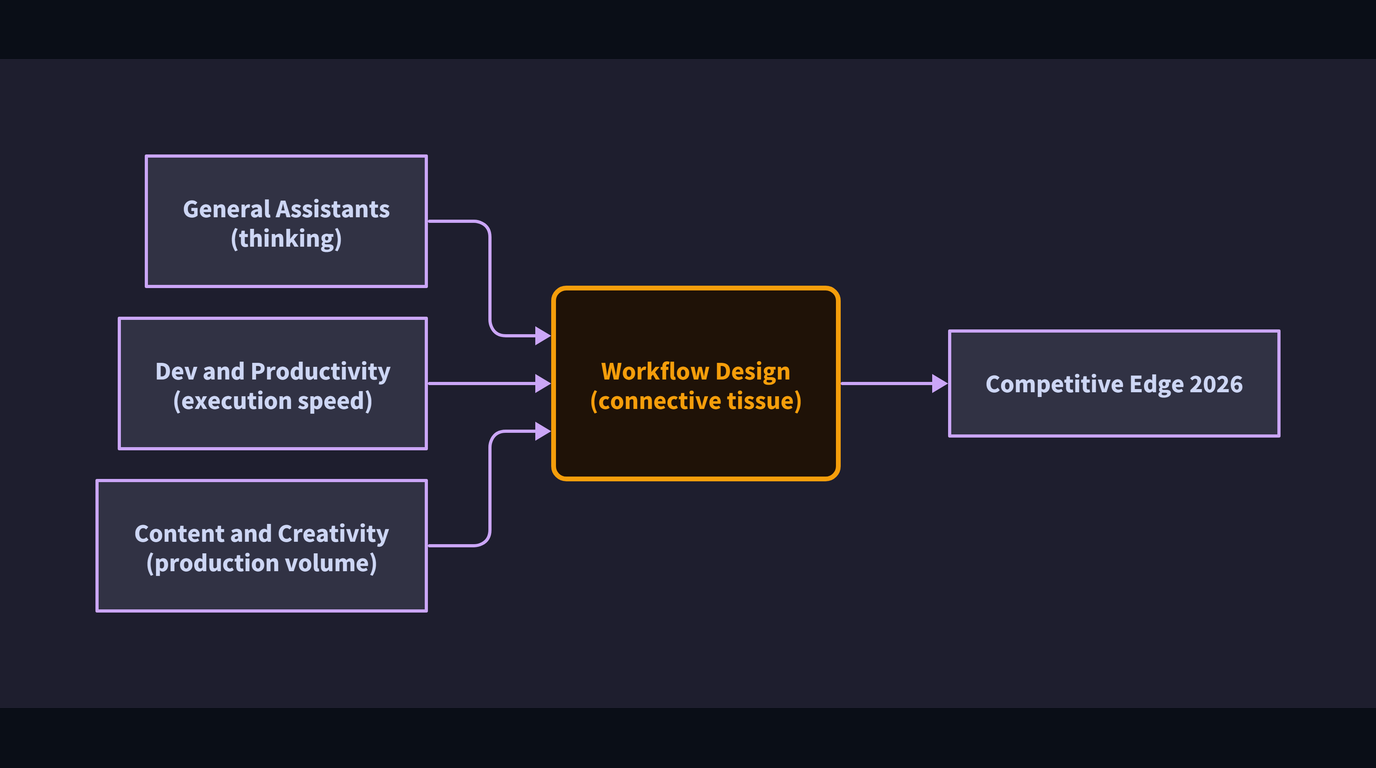
The four-category structure in that post is more useful than it looks at first glance. It maps, roughly, to four different jobs that AI can do inside any operation.
General assistants handle thinking tasks. Research, drafting, summarizing, working through a decision. If someone on your team is starting every task from a blank page, this category closes that gap. A solo agency owner using Claude to draft client proposals is doing the same thing a hospital administrator does when they use an assistant to summarize meeting notes. Same category, different context.
Development and productivity tools handle execution speed. Less time on repetitive output, more time on actual decisions. For a SaaS team, that might mean Cursor writing boilerplate code while engineers focus on architecture. For a marketing team, it might mean NotebookLM (Google’s AI-powered research and note tool) synthesizing a hundred pages of competitive research into something actionable in an afternoon.
Content and creativity tools handle production volume. Video, image, audio, presentations. What the post describes as “what once took days now takes minutes” is not hype for certain task types. A real estate brokerage producing listing videos or a mid-size e-commerce brand generating product imagery for a hundred SKUs is operating in a fundamentally different cost structure than they were two years ago.
Automation tools are the connective tissue. This is the category most operators underestimate. Tools like Zapier and n8n (a workflow automation platform that connects apps and triggers actions between them) do not generate anything on their own. Their job is to connect the other three categories into something that runs without someone manually pushing it forward. The post calls this category “the real power move,” and that framing holds up. A workflow where an assistant summarizes an inbound inquiry, routes it to the right person, and logs it to your CRM without anyone touching it manually is more valuable than any single AI tool in the chain.
What most people get wrong
Operators treat the tool selection as the hard part. It is not. The tools are mostly accessible, mostly affordable, and mostly well-documented at this point. The hard part is workflow design.
Workflow design means deciding which tool handles which job, in what order, triggered by what event, and verified by whom before the output touches a customer or a critical system. Without that design, you end up with what most businesses actually have: a handful of AI subscriptions, used inconsistently, by different people, in ways that don’t connect to each other. The output is slightly faster individual work, not a smarter operation.
The post flags this directly. “The biggest AI winners aren’t just prompting. They’re automating.” That sentence is describing a maturity gap. Prompting is using a tool. Automating is designing a system. Most operators are still in the prompting stage and calling it an AI strategy.
The other thing people get wrong is treating the categories as separate purchases rather than a stack. A creative tool that produces content no one can distribute at scale is just an expensive toy. An automation layer with nothing worth automating is a pipeline to nowhere. The value compounds when the categories talk to each other.
The actual lesson
The list in that post is not the point. The point is the framing underneath it. Knowing which category of tool handles which kind of job, and how those categories connect inside your actual workflow, is the work. That is where the operational difference shows up.
Tool selection is a one-afternoon decision. Workflow design is an ongoing one.
If you are trying to think through how these categories apply to what your team actually does, the resources at xovionlabs.com are a good place to start.