Why I'm Building a Property Management Operating System (and Where I Am Today)
Tool sprawl is the operator's tax. Here's the four-layer system I'm building — data, dashboard, action, AI in the loop — to stitch AppFolio, ClickUp, and the rest into one operating system for a small property management portfolio. Part 1 of a build log series.
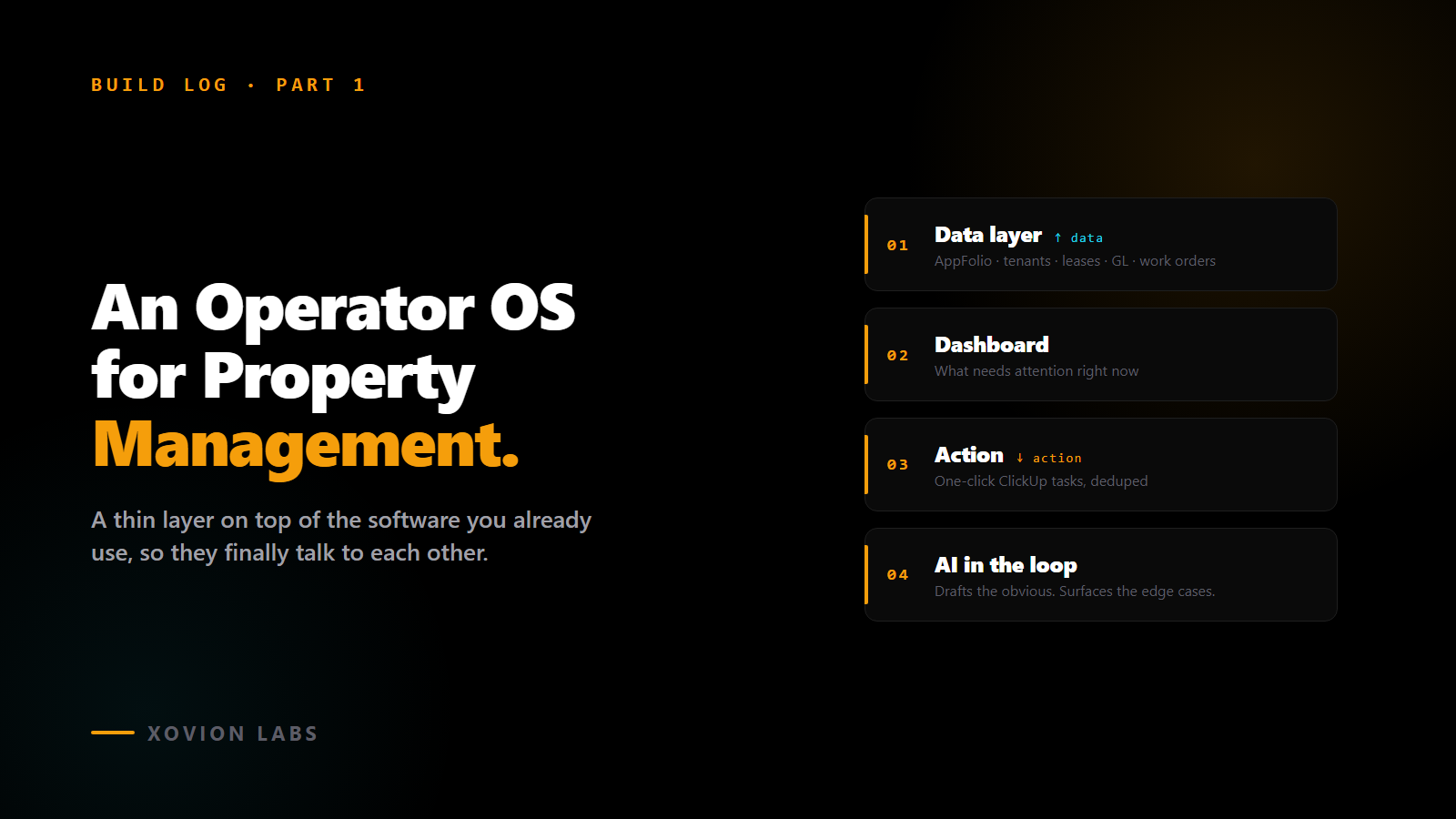
This is part 1 of a series on building an AI operating system for running a small property management portfolio.
If you run rentals — even a handful of units — you already know what tool sprawl feels like. Your data lives in AppFolio. Your tasks live in ClickUp, or Asana, or someone’s head. Your leases live in DocuSign. Your vendor texts live in your phone. Your spreadsheets live wherever you saved them last. Your team uses email for some of it, Slack for some of it, and shouting for the rest.
That’s not a setup. That’s a pile.
I run a small property management portfolio. Seven properties, around 180 rentable units, six different owner LLCs. Small enough that I touch most things directly, big enough that I cannot. For a long time the way I “managed it” was simple: I was the API.
When something needed to happen in AppFolio, I checked. When something needed to land in ClickUp, I typed it. When a vendor needed to know something, I texted. When an owner wanted a P&L, I pulled the report and emailed it. Every single hand-off between systems happened because I personally walked the data across the room.
That works until it doesn’t. The day I forgot to follow up on a delinquency until day 21, or the morning I almost evicted the wrong tenant because the payment had cleared but in the wrong column, was the day I started building something else.
What I’m building is what I call an Operator OS for property management. It’s not new software you buy. It’s a thin layer that sits on top of the software you already use and finally makes them talk to each other — with a little AI in the middle to handle the routine stuff and surface the edge cases.
A quick aside for anyone who hasn’t really used AI yet
I want this series to make sense even if you haven’t put AI to work in your business. So before I keep going, two real examples of what “AI in the loop” actually looks like for a PM operator. Not chatbots, not sci-fi.
Example 1. A rent payment is late. Without AI: you scan the delinquency report once a week, eyeball who’s missing, decide who to text, do it (or forget). With AI in the loop: every morning the system pulls the rent ledger, sees who’s late, looks at their history — has this tenant always paid late? Did they pay last month? Did they put in a maintenance request that’s still open? Then it surfaces the ones that look unusual at the top of your dashboard. The routine ones, it handles itself with a reminder text. No one gets ignored. Nothing weird gets missed.
Example 2. A maintenance request comes in via text. Without AI: someone reads it, decides what it is, picks a vendor, texts them, creates a task. With AI in the loop: the system reads “AC isn’t blowing cold,” knows this is a recurring tenant complaint that twice got resolved by replacing a capacitor, drafts a vendor work order with the history attached, and puts it in front of you to approve. You’re still the one who says go. You just don’t have to type everything.
That’s what I mean by AI in the loop. Not magic. A coworker that reads everything, drafts the obvious stuff, and asks before doing anything that matters.
What I’m building, in four layers
Every piece of this lives in one of four buckets.
The data layer. AppFolio doesn’t expose its data directly — to get at your own tenants and payments and ledger without manually exporting CSVs, you have to go through their API, and that API is gated. I’m using a third-party service called Skywalk to read AppFolio’s data the way a power user would. Every six hours, the system pulls a fresh copy of everything I care about — properties, units, tenants, leases, work orders, vendors, the entire general ledger — and stores it in my own little database. Now my data is mine to query however I want, not just whatever AppFolio’s dropdowns let me filter on.
The dashboard layer. A single page that answers one question: what needs attention right now? It’s not a report. It’s not a vanity number. It’s the five things that, if I disappeared for the day, somebody else could pick up from. Late rent that’s actually concerning. A vacant unit that’s been sitting too long. A work order that’s been open longer than it should be. A lease about to expire that nobody’s renewed. Numbers from the books that don’t add up.
The action layer. Every row on that dashboard has a button. Click it, and the system spins up the right ClickUp task — assigned to the right role, on the right list, with the right description and due date pre-filled. It writes the task once. It will not write a duplicate next time the same row appears. That last part sounds boring; it’s actually the whole game. The day “create task” becomes a click instead of a five-minute typing exercise is the day this thing earns its keep.
The AI in the loop. The piece I started building most recently. It reads everything the data layer sees, drafts decisions, and surfaces the edge cases. The two examples above are real workflows I’m wiring up next.
That’s the whole OS. Four layers. Data in, signal up, action out, AI watching.
Three moves that aren’t obvious until you try to actually build this
Anyone can sketch the four-layer concept. The real work is in the parts you don’t anticipate.
Move 1: the accounting landmines. AppFolio classifies general-ledger accounts into types — Income, Expense, Asset, and so on. You’d assume those classifications are right. They aren’t, often enough to ruin every financial metric on the dashboard. CapEx improvements get coded as ordinary Expense, which makes your NOI look worse than it actually is. Mortgage interest, same problem — pulled out of operating cash flow when it shouldn’t be in there at all. Gross potential rent, vacancy loss, and concessions get classified as Income, which double-counts your actual collections. I had to go through every account in the chart one at a time and force the classification myself, by account number, with a logged fallback rule for anything new I haven’t seen yet. Unglamorous. Mandatory.
Move 2: the reconciliation gate. Here’s the rule the dashboard enforces on itself: if my classified NOI doesn’t match AppFolio’s official income statement NOI for a given property in a given month within a few dollars, the dashboard refuses to show that number. It shows “financials pending” instead. The point isn’t to hide problems — it’s to make sure I never look at a number that’s quietly wrong. A blank cell I’ll investigate. A wrong number I’ll act on.
Move 3: one task source, two ways in. Today, I click a button on the dashboard and ClickUp gets a task. Soon, the dashboard will detect those same conditions on its own and create the same task without me clicking. The trick is that both paths — me clicking, and the automation firing on a schedule — share the same code and the same deduplication key. They cannot accidentally create the same task twice, and switching one workflow from “human clicks” to “automatic” doesn’t require a rewrite. It’s a configuration change. A small detail that saves an enormous amount of future pain.
Where I am right now
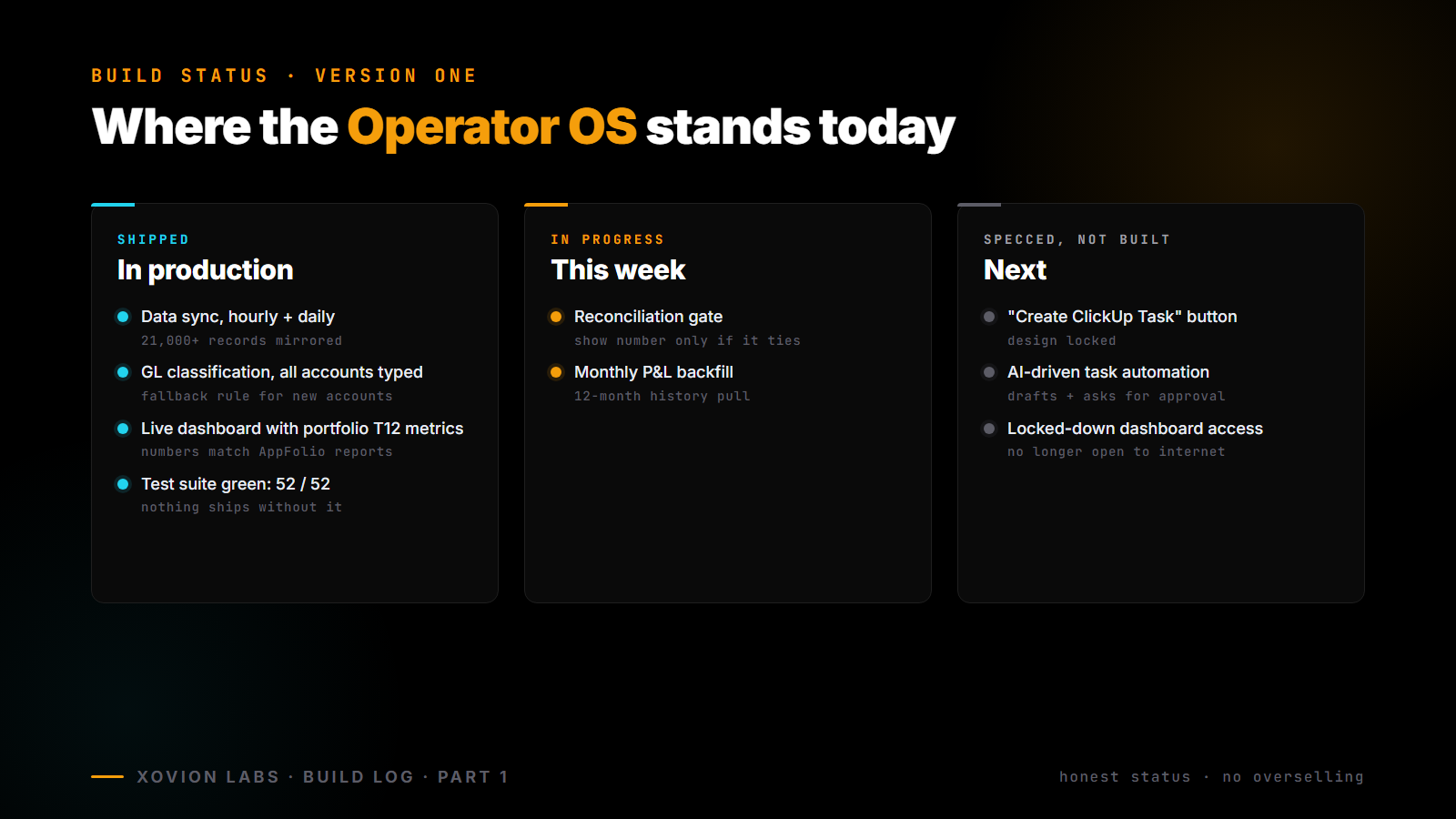
Honest status, no overselling.
Shipped. The data sync — 21,000-plus records pulled from AppFolio into my own database, hourly for the operational stuff, daily for the financials. The general-ledger classification, every account explicitly typed, fallback rule for anything new. The dashboard itself, live, real numbers, trailing-twelve-month portfolio metrics that match AppFolio’s official reports. A green test suite — 52 of 52 tests passing. Nothing ships without it.
In progress this week. The reconciliation gate. The monthly P&L backfill, a long-running job pulling 12 months of history.
Specced but not built yet. The “Create ClickUp Task” button — design is locked, code is next. The AI-driven version of the same button — the part that decides, drafts, and asks for approval. Locked-down access on the dashboard so it isn’t sitting open to the internet.
Probably halfway through what I’d call “version one.” Usable for me today, not yet usable for anyone else.
Why the series exists
A few people in property management have asked what I’ve been working on lately. Rather than answering the same question over text, I’m going to document the whole build here as I go. Future posts will cover the data layer in detail, the dashboard, the action layer, the AI integration, the cost of running this, the first time it catches something I’d have missed, and the parts I screw up along the way.
If you run any kind of rental portfolio and your stack is held together by you, follow along. Steal whatever helps. And if you’re using a different management software or you’ve already solved one of these problems differently, hit reply or comment — I’d rather learn from someone who’s already done it than re-invent it.
The compute is coming home. The operator OS is the next part of that for me. More soon.