Everything Is an Event
A business is just a stream of things that happened — sales, money, field, team, software. Almost none of it gets tracked, and that blind spot is where cash and time quietly leak. The operator's case for making your whole operation visible before you automate any of it.
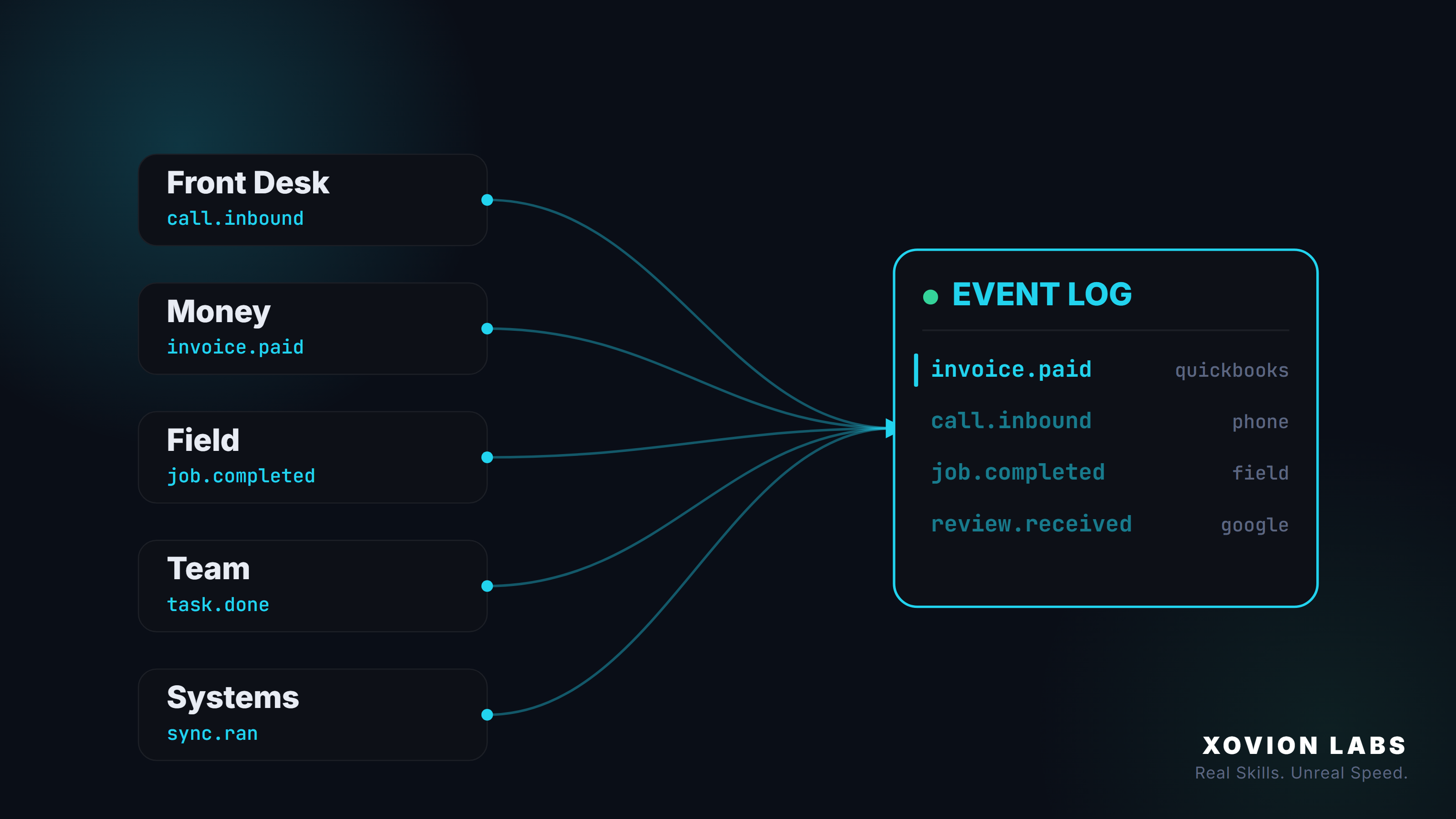
Most people, when they hear “track everything,” think about sales. Leads, calls, where the customer came from, did we follow up. That’s the part everyone’s been trained to measure, because that’s the part marketers sell you software for.
It’s also maybe a fifth of the story.
Your business does not stop generating events when the sale is made. It generates them all day, in every corner, most of them with no customer anywhere nearby. A bill gets entered. An invoice gets sent — or doesn’t. A payment clears. A job gets dispatched. A tech clocks in. A refund gets approved. A vendor gets paid twice by accident. A timesheet gets submitted. A contract gets signed. A reconciliation gets done, or skipped. A report gets pulled. An automation runs at 2 AM and quietly fails.
Every one of those is an event. Something happened, at a specific time, done by or to someone, inside a specific tool. And the back-office events — the finance and admin and operations work that nobody outside the building ever sees — vastly outnumber the customer-facing ones.
Here’s the uncomfortable part: those are the events almost nobody tracks. Companies will spend thousands instrumenting the top of the funnel and run the entire rest of the business — the part that actually delivers the work and collects the money — on memory, spreadsheets, and “I think Sarah handled that.”
So let’s widen the lens all the way out. Not “track your leads.” Track your business — the whole thing — as what it actually is: a stream of events.
What an event is (no matter where it happens)
Strip any business action down to its bones and it’s the same four things:
- WHAT happened — a call, a payment, a job completion, an approval, a clock-in.
- WHERE it came from — the phone system, the accounting tool, the field app, the CRM, the calendar, the payroll system.
- WHEN it happened — the exact timestamp.
- WHO it involved — and this is the part that breaks the “it’s all about customers” assumption. The “who” might be a customer. It might also be a vendor, an employee, a job, or a piece of software.
Plus the details — the full record kept underneath, so you can dig in later.
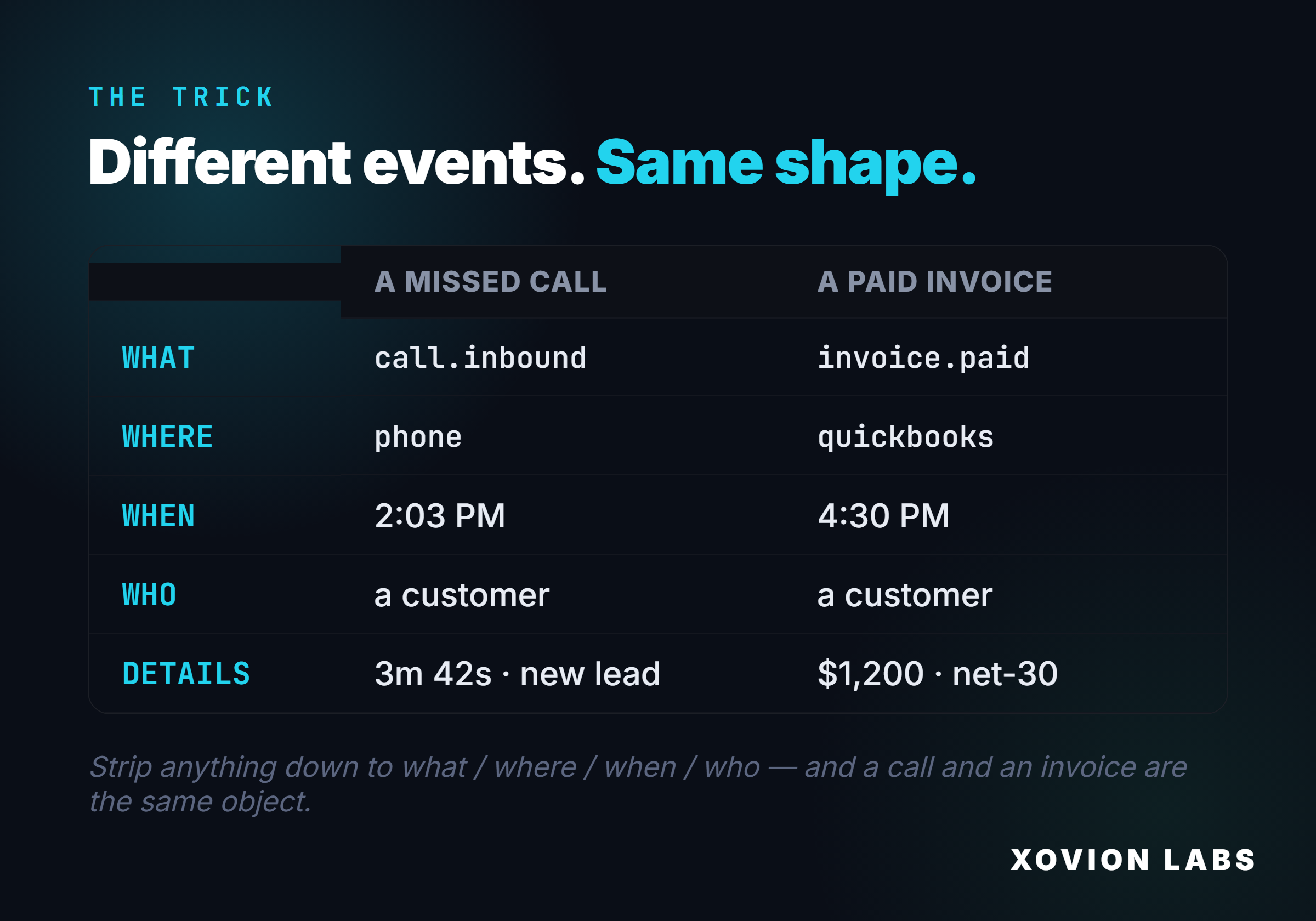
Once you accept that a paid invoice, a dispatched truck, a completed onboarding checklist, and a missed call are all the same shape — what, where, when, who — you stop seeing “departments that use different software” and start seeing one continuous stream. And the whole point of this piece is that the stream can be captured. All of it. Every digital thing that happens in your business is trackable. The only question is whether anyone’s catching it — and in the back office, the answer is almost always no.
The whole map, department by department
Walk the building. Every room is throwing off events.
The front desk. Calls in, calls missed, texts, form fills, new leads, where they came from, appointments booked and cancelled, reviews posted. This is the part you already think about. Keep it — it’s real — but it’s one room.
The money — finance and admin. This is the room that runs your business and the one nobody instruments. Invoices created, invoices sent, invoices still sitting unsent, payments received, payments failed, refunds issued, bills received from vendors, bills approved, bills paid, expenses logged, purchase orders raised, statements reconciled, reports generated. Every one of these is an event, performed at a time, by a person, in a tool. When your bookkeeper marks an invoice sent, that is an event. When a manager approves a $3,000 expense, that is an event. When the month-end reconciliation gets done — or the month closes and it didn’t — that absence is an event too.
The field — operations and delivery. Jobs scheduled, jobs assigned to a tech, jobs started, jobs completed, time on site, materials used, photos uploaded, change orders. The actual delivery of the thing you sell is a dense stream of events, and most of it lives in a field app that talks to nothing else.
The team — people and work. Tasks created, tasks assigned, tasks completed, handoffs between people, clock-ins and clock-outs, timesheets submitted, time-off requested and approved, documents signed, a new hire’s paperwork half-finished. The work your people do on the work — the connective tissue of the operation — is almost entirely uninstrumented in a small business.
The systems themselves. This one surprises people: your software’s own behavior is events too. An automation fired. A sync ran. An integration returned an error. An API token expired. A scheduled report didn’t send. When the plumbing that’s supposed to be catching your events quietly breaks, that break is itself an event you’d want to see — instead of discovering three weeks later that nothing’s been logged since the 9th.
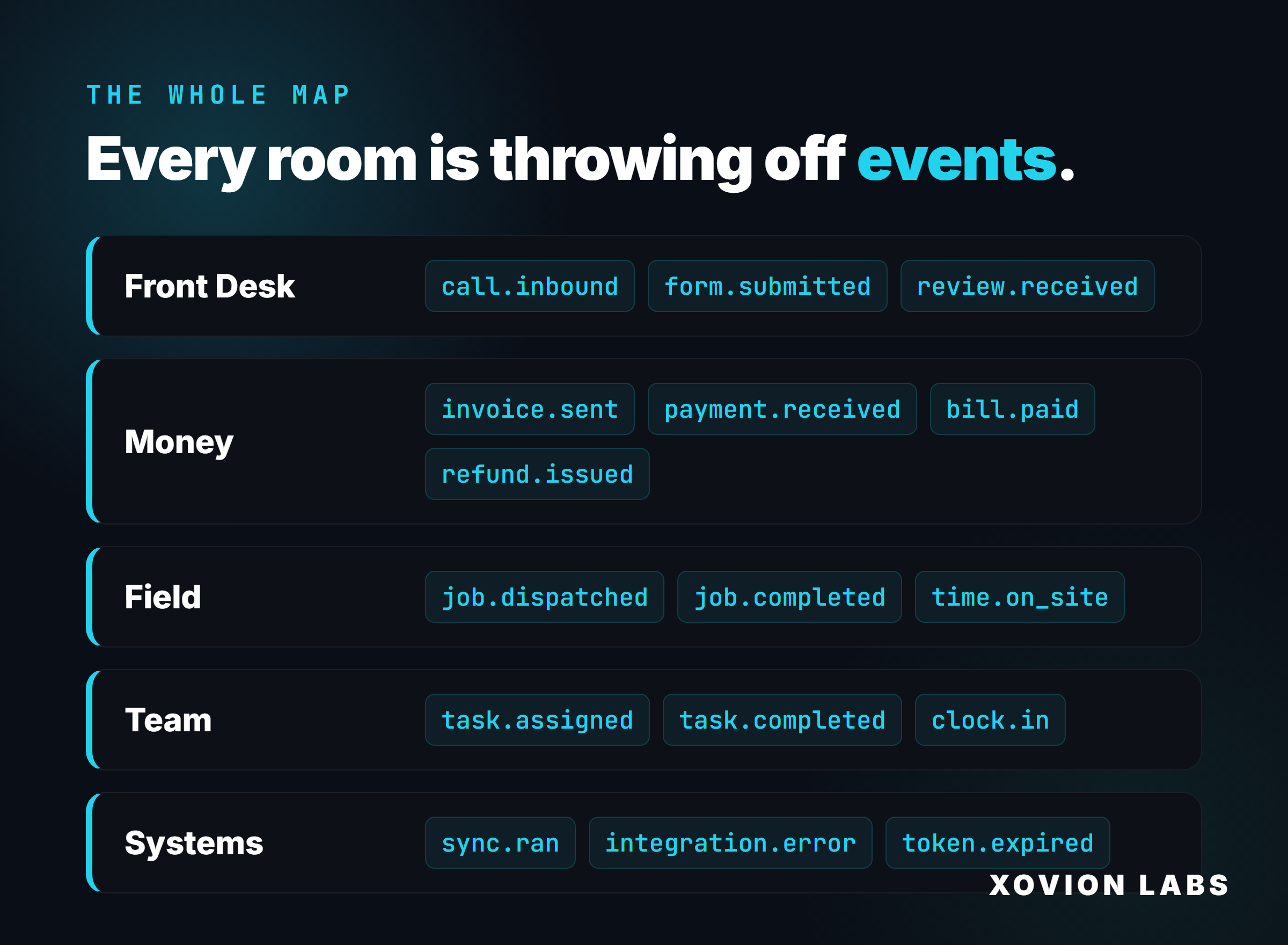
Five rooms. Five dense streams of events. In most businesses, the front desk is half-tracked, the money is tracked only inside the accounting software (and only as numbers, not as a timeline of who-did-what-when), and the other three rooms are tracked nowhere at all.
The invisible middle
Here’s where it actually costs you: the handoffs between rooms.
A job finishes on Tuesday. To get paid, that completion has to travel from the field app, to whoever cuts the invoice, to the invoicing tool, out to the customer, and back as a payment. That journey crosses three departments and four tools. Nobody owns the whole path, and no single system can see it end to end. So the invoice goes out the following Monday instead of Tuesday afternoon — six days of cash you’ll never get back, multiplied across every job, every week, forever. And you can’t even see it happening, because the event “job completed” lives in one silo and the event “invoice sent” lives in another, and nothing connects them.
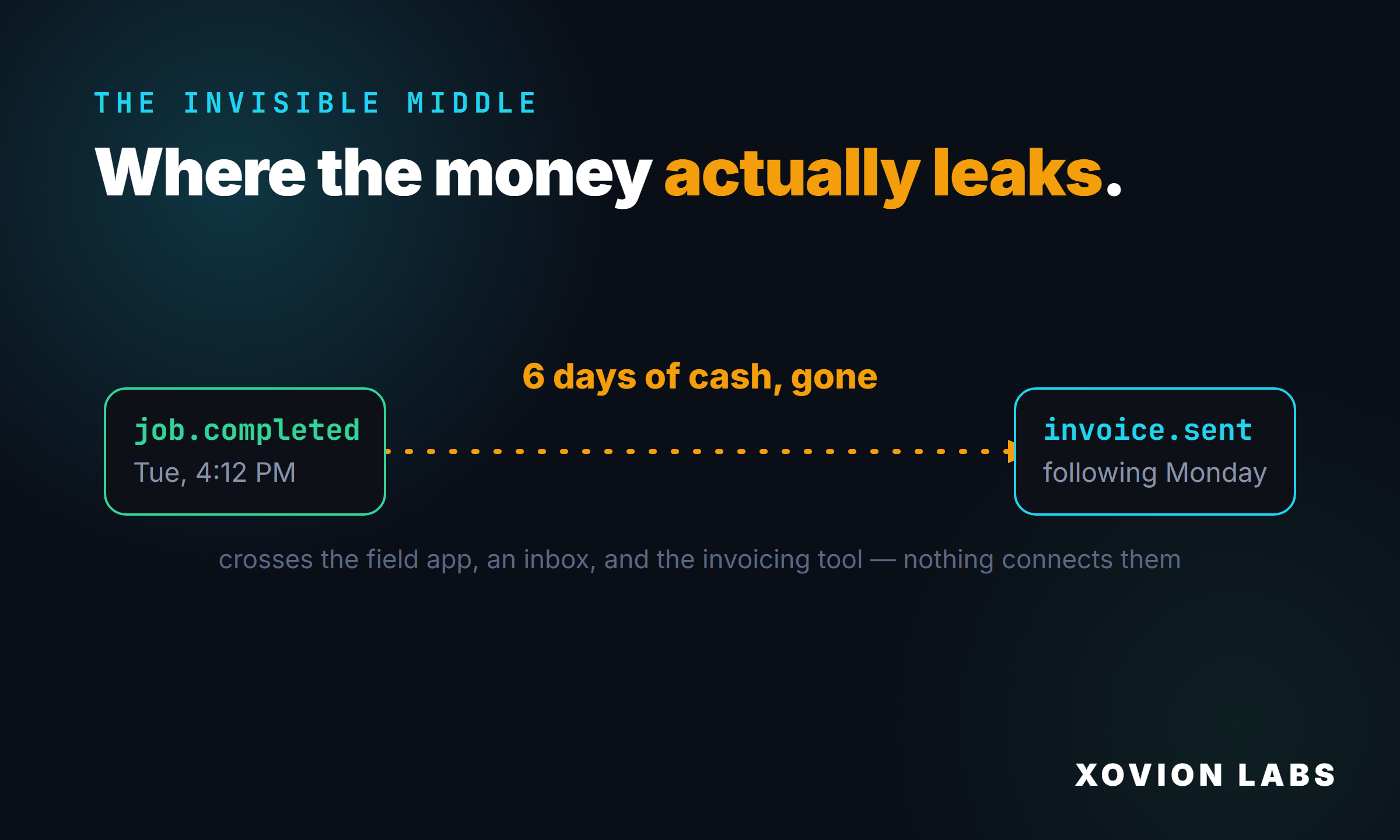
That’s the invisible middle. It’s not the sale and it’s not the accounting entry — it’s the connective tissue between them, the admin work that produces no obvious metric. And it’s exactly where work rots:
- Jobs completed but never invoiced — revenue you earned and never billed.
- Invoices sent but never followed up — receivables aging into bad debt.
- A refund or discount approved by someone, for reasons nobody recorded.
- A vendor bill paid twice because two people both “handled it.”
- An approval sitting in someone’s inbox for three days while the work waits.
- A subscription that auto-renewed for a tool you stopped using in March.
- Month-end reconciliation that quietly didn’t happen.
None of these are dramatic. None of them set off an alarm. They’re small, silent, and constant — and they’re invisible specifically because the events that would reveal them are scattered across tools that don’t talk, performed by back-office people whose work nobody thought to instrument.
Why the back office is the biggest opportunity
The people doing admin and finance are the last ones anyone tracks, for a simple and wrong reason: their work isn’t customer-facing, so it doesn’t feel like “growth.” But that’s precisely why it’s the richest place to turn on tracking.
When you treat admin and finance work as events in one log, three things you’ve never been able to see suddenly appear:
Cycle times. How long from job-complete to invoice-sent? From invoice-sent to payment-received? From bill-received to bill-paid? These are the heartbeat of your cash flow, and right now you’re guessing at every one of them. Make them events and you can measure your cash conversion cycle in days, then shrink it.
Bottlenecks. Where does work pile up and wait? Which step in your admin process is the slow one — and is it a person who’s overloaded, a tool that’s clunky, or an approval that has no owner? You can’t fix a bottleneck you can’t locate. Events locate it.
Accountability to the work — not surveillance of the worker. This is an important distinction. The goal isn’t to watch your bookkeeper’s keystrokes. It’s to make the work visible so things stop falling through the cracks: so you know the invoices went out, the reconciliation got done, the approval didn’t stall. Good people want their work to be visible when it’s done well, and want the system to catch the thing that slipped before it becomes a problem. Tracking the events protects the work — and the people doing it — from quietly carrying the blame for gaps the tools created.
The back office is where the cash actually lives — earned, billed, collected, spent. Leaving it untracked isn’t conservative. It’s the most expensive blind spot in the company.
How you actually track all of it
The mechanism is the same whether the event is a customer call or an internal approval, and it doesn’t require ripping anything out.
Almost every tool you run — the accounting software, the field app, the payroll system, the CRM, the calendar — has a way to report what’s happening. An API: a door the software leaves open so other systems can listen in. The work is connecting to that door on each one.
Events come out two ways. A webhook pushes the event the instant it happens (“a payment just cleared”). Polling knocks every few minutes and asks “anything new?” for the older tools that don’t push. Either way, nothing gets missed.
Then a small piece of software does three things to every event, from every room:
- Normalizes it. A payment from the accounting tool and a job-completion from the field app arrive in completely different formats. They get translated into the one common shape — what, where, when, who, plus the raw details. This is the unglamorous step that makes everything else work: when an invoice and a dispatch and a call all have the same structure, you can finally count, sort, and reason across the entire business at once.
- Ties it to the right entity. Customer events link to a customer. Vendor bills link to a vendor. Timesheets link to an employee. Job events link to a job. The “who” isn’t always a buyer — it’s whoever or whatever the event is about — and getting that link right is what lets you later ask “show me everything about this job” or “everything we did with this vendor.”
- Writes it to one log. Every normalized, linked event lands in a single running timeline — the front desk, the money, the field, the team, and the systems, all in one place, in order.
That’s it. Not AI. Not magic. Plumbing — boring, reliable plumbing — that, once it exists across all five rooms instead of just the front one, changes what you can know about your own company.
The unlock: cross-department questions
When every event everywhere is the same shape in one log, you can finally ask questions that span the whole business — the ones that were impossible when each room had its own incompatible software:
- How long, on average, from a job finishing to the cash hitting our account? (field + admin + finance)
- Which customers have an open invoice and an unresolved complaint? (finance + front desk)
- What did it actually cost us to serve our most “profitable” customer — labor, materials, the three support calls, the redo? (ops + finance + front desk)
- How many jobs got completed last month that we never invoiced? (ops vs. finance — the gap is pure leaked revenue)
- Where did this week’s hours actually go? (team + ops)
Every one of those crosses departments. Every one of them is unanswerable today and trivial once everything’s an event in one log. That’s the real meaning of visibility — not “more dashboards,” but being able to ask your business a real question across its whole operation and get a true answer.
What you get the day this exists
A real operating picture — not a sales report. The morning pulse now covers the whole company: calls and leads, yes, but also cash collected and cash owed, jobs completed vs. invoiced, bills due, hours logged, and anything that broke. The actual state of the business, in thirty seconds, without logging into seven systems.
Anomalies across every room that surface themselves. Invoices completed-but-unsent. Receivables aging past terms. A duplicate payment. An approval stalled two days. A reconciliation overdue. An automation that silently stopped. A weekday with zero leads. The system watches all five rooms and raises its hand before the small silent thing becomes an expensive one.
The truth about your cash. Not just “what’s the balance,” but the timeline: how money moves through your business, where it gets stuck, and how many days you could cut out of the cycle.
And the foundation for everything after. Automations, follow-up, AI that can actually help — all of it depends on the system knowing an event happened the instant it happens, in every room, not just the front one. The automation everyone wants is built on the tracking layer. It is never a substitute for it.
The order still holds — see everything first
The sequence doesn’t change, it just gets wider. See before react before grow. But “see” no longer means “see your leads.” It means see the whole operation — front desk, money, field, team, and systems — as one connected stream.
Skip it and automate on top of an operation you can’t see, and you don’t get leverage, you get faster chaos: a broken admin process running at machine speed, money leaking out of rooms nobody’s watching. Get the visibility first — across the entire business — and everything you build on top of it actually holds.
Why this is the real asset
There’s a long-game reason this matters more than any single report.
A complete event history — every room, captured cleanly, over time — is the system of record for your entire company. Not your CRM. Not your accounting file. The whole thing, in one timeline. That’s an asset that compounds: a year of it tells you your true margins, your real cycle times, your seasonality, which customers and jobs and vendors actually make you money. You can’t buy that. You can only accumulate it, and only if you started capturing it.
It’s also the thing that makes AI worth anything in your business. An AI that can see only your CRM is a chatbot. An AI that can see every event across sales, operations, finance, and your team can actually run things — chase the unsent invoice, flag the stalled approval, answer “where’s my money” with the real timeline. AI is only ever as good as the events it can read. Give it the whole business, and it has something to work with. Give it one silo, and it’s guessing. Capture first, automate second.
How to start — audit every room, not just the front
You don’t need to build anything to begin. You need an honest walk through all five rooms. Block an hour and answer this for each one:
- Front desk: How does a lead enter, and what happens next? Where does it stall?
- Money: When a job is done, how long until the invoice goes out? How many are sitting unsent right now? How old is your oldest unpaid receivable? Who approves expenses, and is it recorded?
- Field/ops: When a job is completed, what records it, and does anything downstream find out automatically?
- Team: How do you know what got done yesterday and what didn’t? Where does work get assigned, and where does it fall off?
- Systems: If one of your tools stopped syncing today, how long until you’d notice?
For every question that’s uncomfortable to answer, that discomfort is the map. Each gap is an event your business is generating and failing to catch — and in the back office especially, an uncaught event is usually cash or time leaking somewhere you can’t see.
The whole thesis, in one line: you can’t automate what you can’t see, you can’t see what you don’t track, and “everything” means every room — not just the one with the customers in it.
Track the whole business first. The rest gets a lot easier.
That audit is most of the work, and you can run it this week without buying anything. Walk your five rooms, and if the answers make you wince — that wince is the map. I write about wiring this kind of visibility into real operations as I go; come find me on @xovionai.